





You made something that worked on TikTok. The obvious next move is to put it on Reels and Shorts. Then you download it, and there it is: a bouncing logo and your handle burned into the frame, announcing to a rival platform exactly where the clip came from.
That announcement has consequences. Instagram’s head, Adam Mosseri, addressed this directly in October 2024, saying that a Reel carrying your own logo does not hurt reach — but content visibly recycled from other apps, competitors’ logos included, is held back from Explore and recommendations. Read it as platform guidance and as behavior creators keep reporting, not as a number anyone has measured for you. Whatever the exact mechanics, the fix is the same: do not hand the algorithm an obvious flag.
The rule that comes before any of this
Everything below assumes the video is yours, or that you hold a license to edit and republish it. Stripping a watermark off somebody else’s clip is not repurposing; it is removing attribution from work you did not make, and it breaks the terms of every platform involved. The Overchat AI tool page says so on its own FAQ — removing a watermark does not grant permission to repost or commercially use someone else’s content. If you did not shoot it and you have no license, the answer is to ask, or to leave it alone.
The best answer is not a tool at all
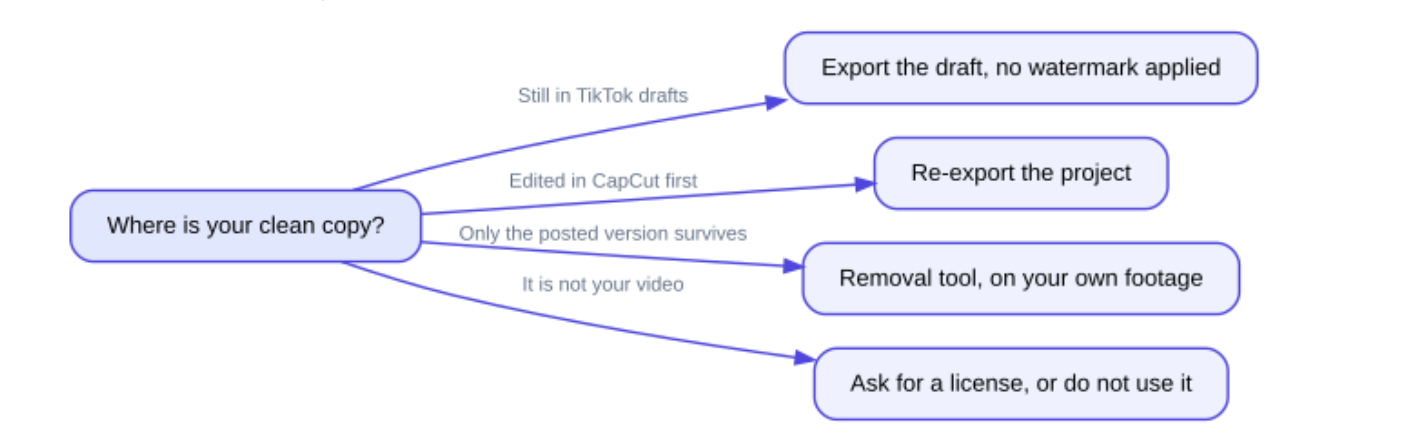
Before anything gets removed, check whether the mark ever needed to exist. TikTok applies the watermark on export from the app, not to the file you started with. So there are usually two cleaner copies floating around, and neither has ever been touched.
Where to look for a clean master before reaching for a removal tool — and the branch where the honest answer is to stop.
The draft route: if the video still sits in your TikTok drafts, the pre-post export has no watermark applied. The editor route: if you cut it in CapCut, the project is still there, and CapCut’s own marketing states its exports come out without a watermark — re-exporting the timeline gives you a pristine file at full quality. Either beats any repaint, because nothing has been repainted.
The habit worth building is dull and effective: every time you post, save the export to your camera roll first, in a folder you can find. Then the Reels version is a copy, not a reconstruction.
When only the posted version survives
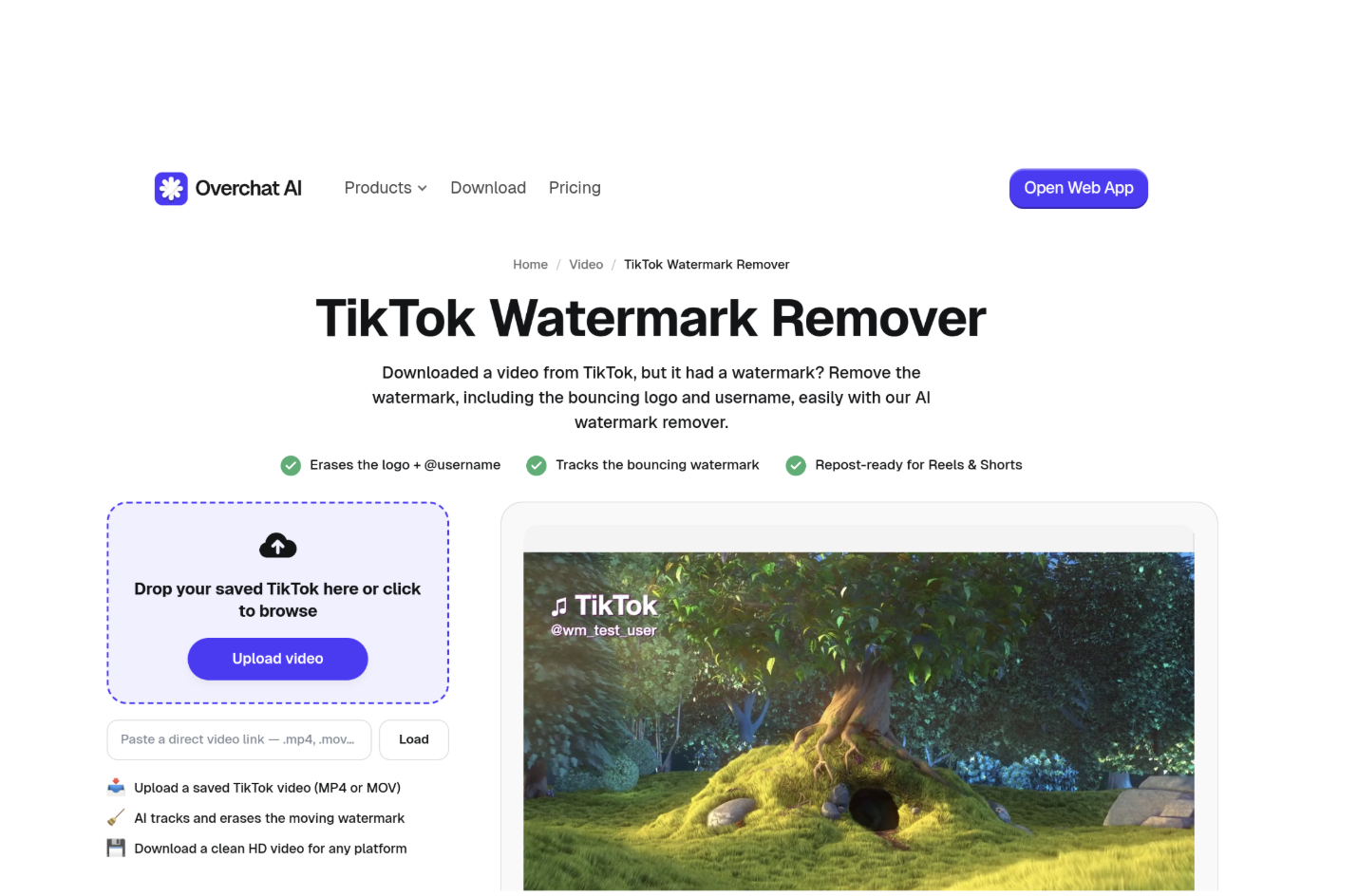
Sometimes the phone was wiped, the draft was cleared, or the clip was posted from a device you no longer have. That is what removal tools are for. Here is the flow on the TikTok Watermark Remover page, step by step.
The four stages the tool page documents, with the format and size ceilings it publishes attached to the upload stage.
Step 1 — Save the TikTok to your device, then upload it. The page accepts MP4, MOV and WebM, up to 60 MB and around 16 seconds. Where this goes wrong: those ceilings are strict and easy to breach. A 45-second clip is out of scope entirely, and a high-bitrate 4K export can pass 60 MB in well under 16 seconds. Trim or transcode first rather than waiting on an upload that will be rejected.
Step 2 — Let it detect the mark. The tool looks for the TikTok logo and the username together. The FAQ is specific about the hard part: the watermark hops between corners during playback, and the tool is built to track it across each position rather than treating it as one fixed patch. Where this goes wrong: detection is aimed at the standard TikTok mark. A second overlay — a template’s branding, an editing app’s badge — is not what it is looking for, and it will be left behind.
That page belongs to the wider Overchat AI catalog: an all-in-one app with 150+ purpose-built tools across image, video, audio and text, sharing one account and one bill. Behind them sit models from GPT, Claude, Gemini, Grok, Kimi and Qwen, on web, iOS and Android, with 350,000+ users. Twelve months of Pro is $59.99; the rolling monthly rate is $14.99. Subscribing separately to ChatGPT Plus, Claude Pro and Google AI Pro totals about $59.99 a month; the same $59.99 covers Overchat AI Pro until next September.
Step 3 — Preview before you download. The tool fills the gap by rebuilding what should be behind the logo, and its own FAQ is candid that results vary with what sits under the mark. Where this goes wrong: people skip straight to download and discover the smear on the timeline in Instagram. Scrub the exact corners the watermark visited, at full size, not thumbnail size.
Step 4 — Download the MP4. The output keeps the original audio track, so there is no re-syncing. The frame is not cropped either: the FAQ states the mark is taken out of the existing frame rather than the video being trimmed around it, which matters because cropping a 9:16 clip to hide a corner costs you safe-zone space you need for captions. Where this goes wrong: the file you get is a fresh encode stacked on top of TikTok’s own compression. Do any color or speed edits before this stage, not after.
What actually fails, and what it looks like
A static mark sitting on a plain wall, a sky, or an out-of-focus background repaints almost invisibly — there is little detail to invent. The failures are predictable and they cluster:
- Busy texture under the mark. Brick, foliage, patterned fabric, text on a shelf behind you. The rebuild guesses, and the guess wobbles frame to frame.
- Motion through the corner. A hand or a face passing under the logo gives the model conflicting information about what belongs there.
- Semi-transparent overlays. Where the mark blends into the footage, its edges bleed, and a faint rectangle often survives.
- Second-generation files. A clip already downloaded, reposted and downloaded again has compression artifacts baked in, and repainting on top of them compounds the mush.
When a result looks wrong, the fix is rarely to run it again. It is to go back and find the clean master.
The alternatives, and what each one really does
|
Route |
What it does to the pixels |
What it needs from you |
Where it falls down |
|---|---|---|---|
|
CapCut re-export |
Nothing — renders from source |
The original project still on file |
Useless if the project is gone |
|
TikTok draft export |
Nothing — never watermarked |
An unposted draft |
Only works before you post |
|
Overchat AI removal |
Rebuilds the area behind the mark |
MP4/MOV/WebM, 60 MB, ~16 s |
Short clips only; artifacts on busy backgrounds |
|
VEED cover or crop |
Hides it — crop, sticker, or text over the top |
A spot you can afford to lose |
Crops the frame or leaves a visible patch |
|
VEED TikTok downloader |
Pulls the file, no repaint |
A public, download-enabled video |
Its own terms limit you to content you own or may repurpose |
The VEED route is worth understanding because it is honest about being a different thing. It does not reconstruct anything — it crops the watermark out of frame, or lays a sticker, logo or subtitle block over it. On a vertical clip that is a real trade: you either lose frame or you visibly cover a corner. Sometimes covering it with your own branding is the smarter move anyway, since Instagram’s guidance treats your own logo as harmless.
The two approaches side by side: prevention costs a habit, removal costs image quality and rules out anything you do not own.
Pick prevention where you can. Save the clean export at the moment you post, and the Reels version is just a file copy. Removal is the fallback for footage you own and cannot re-render — useful, imperfect, and never a workaround for permission you do not have.